

A Step-by-Step Guide to Download: iOS 18 Public Beta 3
Apple has released iOS 18 Public Beta 3, offering a sneak peek into the latest features and enhancements coming to iPhones later this year. This update brings refinements to the Photos app and a new feature in Safari that helps eliminate distractions on websites. If you’re eager to try out iOS 18 before its official release, follow these simple steps to download and install the public beta on your iPhone.
Compatibility and Precautions:
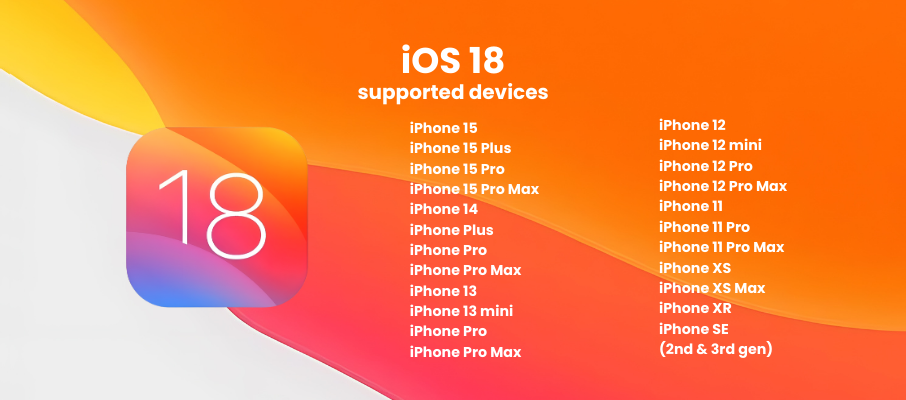
Before proceeding, ensure your iPhone is compatible with iOS 18 Public Beta 3. The list of supported devices includes iPhone SE (2nd generation and later), iPhone XR, iPhone XS, and later models. Keep in mind that the public beta may still contain bugs and issues, so it’s recommended to use a spare iPhone if possible. If you do decide to install the beta on your primary device, be aware that you may encounter some glitches.
Preparing for the Update:
Before downloading the public beta, update your iPhone to the latest iOS 17 version (currently 17.5.1) and back up your device.
- Go to Settings > [your name] > iCloud > iCloud Backup and select Back Up Now.
Downloading the iOS 18 Public Beta 3:
- Visit the Apple Beta Software Program website on your iPhone and sign in or create an account.
- Tap the iOS tab and find the iOS 18 Public Beta 3 information.
- Under Get Started, select the “enroll your iOS device” link.
- Go to Settings > General > Software Update > Beta Updates and choose the iOS 18 Beta.
- Finally, go to Settings > General > Software Update and install the iOS 18 public beta.
Once your iPhone reboots, you’ll be running the latest iOS 18 public beta. Enjoy exploring the new features and improvements!
Main Features:
- Refined Photos App: Improved navigation and interface.
- Safari Distraction-Free Mode: Hide ads and videos on websites.
- Satellite Text Messaging: Send texts via satellite for emergency situations.
- Dedicated Password App: Manage login credentials in one place.
- Enhanced Customization: New widgets and layouts for home screen.
- Improved Control Center: Easier access to frequently used settings.
- Advanced Safari Features: Remove distractions and clutter for a better browsing experience.
I don’t think the title of your article matches the content lol. Just kidding, mainly because I had some doubts after reading the article.
Your article helped me a lot, is there any more related content? Thanks! https://accounts.binance.info/vi/register?ref=MFN0EVO1
Thank you for your sharing. I am worried that I lack creative ideas. It is your article that makes me full of hope. Thank you. But, I have a question, can you help me? https://accounts.binance.info/register-person?ref=IHJUI7TF
Thanks for sharing. I read many of your blog posts, cool, your blog is very good.
Your article helped me a lot, is there any more related content? Thanks!
Thank you for your sharing. I am worried that I lack creative ideas. It is your article that makes me full of hope. Thank you. But, I have a question, can you help me?
Thanks for sharing. I read many of your blog posts, cool, your blog is very good.
I don’t think the title of your article matches the content lol. Just kidding, mainly because I had some doubts after reading the article.
Về dịch vụ CSKH, 888SLOT theo đuổi tôn chỉ “Ưu tiên trải nghiệm khách hàng”, từ đó đảm bảo mang tới cho bạn những giây phút giải trí có 1-0-2. Chuyên viên tư vấn tại nhà cái chúng tôi luôn được đào tạo bài bản, sẵn sàng phục vụ hội viên mọi lúc mọi nơi. TONY05-07